Unresolved Problems with AGIGA EchoVision glasses
Last updated: 2026-07-07
These are feedback, defects and problems I have reported to AGIGA regarding the EchoVision glasses that remain unresolved at the time of this writing.
Note: Many of the links below are into invite-only Google Groups and will not be available to people not granted access.
Configuration information:
· Samsung Galaxy S25 Ultra, Android v16, OneUI 8.5. This is my daily driver phone and my primary testing platform.
· Samsung Galaxy S10+, Android v12. This is my retired backup phone that in this context I use as a sanity check for problems that seem OS-specific.
· companion app: (Android) : 1.3.11, Beta
· EchoVision v1 alpha – primary testing device
· EchoVision Pioneer – secondary testing device
· EchoVision system software: 2026.0703.01
· EchoVision firmware: 2026.0630.01
Software
Gallery media download is flaky and unreliable
2026-03-06 - still not reliable, but persistent multiple attempts can yield results eventually
Additional stuff here - camera and recorded video quality
Screen recording of media download failure - https://drive.google.com/file/d/12xsq71uhWPsXFh5vxzwJsRAnhLa7aW7J/view?usp=sharing
2026-04-11 - It still takes many (5-10) attempts to download media. It is nice that there is now a message indicating failure to download due to connection timeout and an option to retry, but that's not enough. Also, if you respond to the error pop-up with "OK" when you combe back to the gallery page this error message is popped up. Also, sometimes the download appears to work, but then the gallery page does not reflect this. The gallery page shows media is still there to upload. Sometimes in this case the dowloaded media shows up at the bottom of the gallery page and also is included in the phone's gallery page. Weird. See also
2026-05-23 - no change, still
flakey as ever.
After many failed attempts with no success I put my glasses in the charging
case to recharge. Amazingly enough, the
media downloads were successful while the glasses were charging in the charging
case. Is that the way to maximize the
chance of success? Is this required and
nobody told us?
Media
download success criteria?
In the case charging doesn't make media downloads reliable
2026-06-14 - still mostly doesn't work 98% of the time. It generally takes me upward of a couple of dozen attempts before it finally works. Reported again.
2026-06-16 - v1 glasses received. Can't update to latest sw/fw updates, but media downloads are working much better on the v1 on the Galaxy s10+, Android v12. I tried the v1 glasses on my Galaxy S25 Ultra Android v16 and the downloads still fail most of the time. Seems to be specific to the Galaxy S25 Ultra Android v16 configuration.
2026-06-23 - tried media downloads
on S10+ with Pioneer glasses. Worked
mostly okay. There were some failures,
but they claimed the glasses weren't connected (which was false). Rebooting the glasses and or the app helped
clear that.
So it seems like this problem is specific to the S25
Ultra (or the Android v16 or OneUI 8.5),
2026-06-23 - sent an update email on this to bug-report@agiga.ai and Han Zheng.
2026-06-25 - download prolemb
2026-07-01 – downloads continue to mostly fail even using the Samsung Galaxy S10+ Android v12.
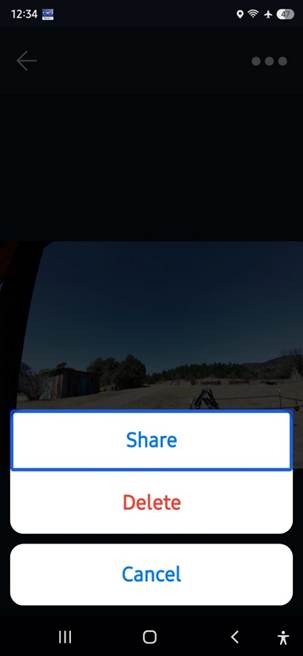
Gallery item controls UI color theme accessibility - not honoring system color theme.
2026-04-11 - problem still exists
2026-05-23 - no change
2026-06-14. Still busted. Reported again.
bluetooth audio drop outs
2026-03-07 - no change
? Not mentioned in known issues & wish list
2026-03-09 - submitted audio recordings of MRB & EVG glasses using soundscape via email.
2026-03-10 - performed screen
recording of successful use of Soundscape on the same route. Trimmed off the
video to get an audio (mp3) file.
https://drive.google.com/file/d/1zFH5rYyE9NVjOy4WwA-cn_870fJGIlC9/view?usp=sharing
2026-04-10 - retested after Apr 10 systm update -- problem still exists
Test files found in google drive / EVG near the bottom of list: uncanhy valley & stoundscape
2026-05-24 - still a problem
2026-06-14 - still busted. Reported again.
2026-06-19 - Tested offending audio files on v1 glasses on Samsung Galaxy S10+ Android v12. No dropouts! Hypothesis is that my particular Pioneer glasses had some glitchy audio output processing hardware.
2026-06-20 - Not so fast there, bucko. I tried the v1 glasses on my Samsung Galaxy S25 Ultra, Android v16 OneUI8.5 and the drop outs continued with both audio samples. So the problem doesn't vary with specific Pioneer or v1 glasses, but with Android version. Oh joy! But the newer phone is, obviously, my daily driver phone, so the EVG needs to work there.
2026-06-23 - Further confirmed that the problem seems linked to the phone. I tried the tests on my S10+, Android v12 with the Pioneer glasses. Both worked fine.
2026-06-23 - sent an update email on this to bug-report@agiga.ai
Persistent media play
2026-02-26 - logs & feedback submitted
2026-03-07 - still randomly occurs
? Not mentioned in known issues & wish list
2026-04-11 - Haven't reproduced since latest update, but this tends to be random so that is not surprising.
2026-05-24 - still a problem
2026-06-04 - There are so many problems with having phone audio routed to the glasses that I have quit routing phone audio to the glasses. AGIGA isn't given my myriad issues with this any attention so I've abandoned this usage for the most part.
2026-07-04 – I haven’t yet reproduced the problem on the v1 alpha glasses, but my usage of them in situations where this occurs are not exercised as much since the v1 alpha glasses do not have my prescription lenses in them, so I don’t really use them when I’m out and about and I have reduced to the point of nearly never using routing of phone audio to the glasses.
EV glasses status request truncation of power status when requested during media player using the glasses as a BT headset.
2026-03-08 - dumped logs & provided feedback
2026-04-11 - problem still exists
2026-05-24 - still a problem
2026-07-04 - Problem still exists. I don't know if this is new, but I noticed that doing the 3x power button press while playing a media player leaves the media player paused after the glasses announced the status (truncated).
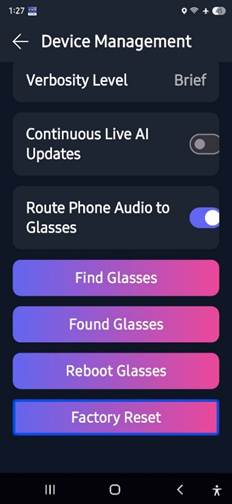
App UI on Settings > Device Management not using system color theme for buttons at bottom
Sent logs & feedback in February. And reported a few other times as well.
2026-04-11 - they seemed to have changed it, but the contrast is still wrong
2026-05-23 - unchanged
2026-06-14 – unchanged
2026-07-04 - unchanged
User Guide accessed via companion app always uses high contrast white color them ignoring user's system settings.
Reported via email after last version of User Guide released and submitted feedback.
2026-04-11 - problem still exists.
2026-06-14 - still a problem. Reported, again. And now the version of the UG via the app is out of date: 2026-02-xx, not 2026-05-27 (as in on AGIGA website).
2026-07-04 - Still a problem and reported again along with A LOT of feedback on the 2026-05-27 version of the User Guide, Troubleshooting Guide and Tutorials.
device management items not reflecting status
2026-06-14 - no change. Reported, again.
2026-07-04 - no change. Still busted.
Live AI non-responsive when battery SOC is less than 20%.
2026-05-23 - encountered and reported.
If it is going to have this restriction the glasses should detect this and notify the user that Live AI requires battery SOC > 20% to use Live AI rather than just being non-responsive.
2026-06-14 - Live AI still generally flakey when SOC is low.
2026-07-04 - no change.
Live AI not continuous silent after being turned on after saying "Here is what I see."
2026-05-25 - reported.
Live AI not continuous silent after being turned on after saying "Here is what I see."
2026-06-14 - still happening. Apparently, this is the new expected behavior.
2026-07-04 - This still happens. In my latest testing this does not always occur, but usually does. There are also times with Live AI goes silent and refuses to respond to prompts. This happens on both continuous and non-continuous.
Media play touchpad tap for play / pause inaccessible after AI 1x (scene description) times out
2026-05-23 - reported
After using Scene Description and allowing it to time out a single tap on the touchpad to resume play of the last played media does not work. The glasses respond as though the glasses are still in an AI mode with "play" or "pause" and do nothing with media play. The user must long press the AI button as though terminating an AI operation in order to get the media player play/pause back.
2026-06-14 -no change. Reported, again
2026-07-04 - no change. Problem still exists/
Wake Phrase stops being recognized after a while.
Wake Phrase is an experimental feature currently only available to Beta testers.
2026-05-26 - reported.
2026-07-04 - still a problem.
History Tab items thumbnail images apparently often random
2026-06-25 - History Tab thumbnail images
2026-07-04 - still a problem.
Phantom responses left in history for general Q&A prompts
2026-06-25 - Phantom responses left in history
2026-06-27 - Re: [EchoVision Pioneer Users] Digest for pioneers@agiga.ai - 9 updates in 6 topics
2026-07-04 – problem remains
Settings > Wi-Fi unexpected behavior
2026-06-24 - Settings Wi-Fi
Reading Mode Enhancements - follow-up questions and text export
2026-06-24 - reading mode enhancements
What does RSS or RSSi mean in context of scanning for glasses?
2026-06-20 - Scanning for EVG meaning of RSS field?
Disabling media player play/pause control
202-06-30 - disabled phone media player controls
Submitted feedback and logs
AI over-anxious to call AIRA
2026-07-04 - feedback sent.
I launched Q and A mode to ask it a question about the best way to interact with AIRA using the EVG. That long prompt used the word "AIRA" once. It did not answer my question, but instead called AIRA. That is problematic. Some folks can't get the glasses to call AIRA and I'm getting it to call AIRA by just using the word "AIRA" in a long Q and A prompt.
Feedback Report no confirmation of sent and launching Scene Description
When providing feedback to AGIGA via the 5x AI/Action button press and I complete my voice message and tap the AI/Action button once to complete my message it sometimes does not confirm that the feedback was sent and goes into Scne Description. This usually happens when I’ve provided a voice message that is nearly as long as the maximum allowed messange length. It seems like it may have silently stopped recording my feedback and registers my single AI/Action button tap as the gesture to launch Scene Description rather than to stop my feedback voice message.
Hardware
Change in the fit of glasses (loosening with use)
Reported: 2026-04-06
2026-06-14 - received v1 glasses. The new hinges are not floppy at all. The fit seems a bit looser on me than the Pioneer glasses. I put the largest nose pads on. They helped a little, but not sufficiently.
status LED alternative
Audio presentation of status were and when possible.
For User Guide - describe what the lights mean.
Documentation, tutorials and support materials
On-boarding w.r.t. UI controls
2026-03-06 - submitted to Pioneer forum for their perspective
More: EVG user input misc
More: Me and the touchpad.
See also: An update on known issues and wishlist - March edition
Hardware #3 - no plan to tweak touchpad hardware